Showing posts with label IT. Show all posts

Saturday, February 19, 2011

Time to Consider a New Way to Read Your Books...!

I've been wondering this question in my mind for so long. Why people don't get interested in e-reader? Low passion for reading? I don't think so, I've seen so many people love to read but they prefer to use their money to buy iPad with the main purpose to read e-books. Every time I heard that reason I just want to shake him/her and say "Come on, don't cover up your desire to have an iPad just with the reason to read e-books. It's non sense!". Why it is non-sense to read e-books on iPad? Let me explain a little bit for you.

Have you ever read an e-book such like a PDF file in your computer for a long continuous time? I bet not all of you did that and trust me I had. For once I found some sample pages from going-to-be-famous novel but I can't find any bookstore that sells it in my country. So I downloaded the full version PDF file and I read it in my computer for a few days. And guess what? It's very uncomfortable. I have lowered my monitor brightness but still the light comes out my monitor still hurts my eyes. After hours of reading and finished that novel I found my eyes feel hurts and swelling for two days.

PS : Lately after I finished that novel I just realized that Twilight is very popular, and yes..I've been reading Twilight Saga series just before it starts to get popular here.

Anyone wonder why reading in computer tiring your eyes more than reading a printed book? The process of how lights get into our eyes while  reading books and looking at computer's monitor is quite different. In a dark room you can see that your computer's monitor is still bright and producing light, that's what make our eyes easily gets tired from reading at monitor : too much light get into our eyes.

The question now, is there anyway we can read in some electronic devices that don't produce light and not tiring our eyes just like the way we read a printed book? There is, an electronic ink or E-Ink. Ever heard about it? Try yourself to do some googling for the complete information. Not every electronic device using E-Ink for it can only produce black and white or gray-scale color.

So, if you are considering a better way to read books such as easily bring your books anywhere and a comfortable reading try to consider an electronic reader or e-reader. Some top famous e-readers are Kindle, Nook, and Sony Reader. When you look at the price you might say it's little bit expensive for they cost as much as your BlackBerry or your smartphone. But consider this, when you purchase a book especially an english printed book it would be quite expensive especially technical IT related books, they can cost from hundreds of thousands to millions and definitely not easily to carry for they usually big and heavy. Here is you benefit points if you have an e-reader :

  • No need to carry heavy books, you can read it anywhere for you can bring it anywhere with you
  • Definitely go green, save space and less maintenance effort
  • Not hurting your eyes anymore
  • It just as expensive as 2-3 english edition of your technical books
  • You can have an enormous source of books using your internet, just as far as one click download.
  • Buying e-book is cheaper than the printed ones
  • It doesn't glare under bright sunlight (you can read while sunbathing). And this condition doesn't work at any tablet even an iPad.
That's it. Maybe that's not all of the benefits yet but I hope at least you have the big picture in your mind why you should considering to purchase an e-reader instead of iPad if you love reading so much (^_^)

Saturday, January 1, 2011

No More Disconnected Mobile Modem...!

I've been using Vodafone Huawei E172 for two years. Just like others mobile modem user I used to have some problems with my Huawei but after two years experience in using and troubleshooting now I can say mine is perfect...! Hooray, no more disconnected modem! Wanna know my tips? Check this out.

First, not all USB ports support the modem, some of it seems lack of electrical power that make the modem seems disconnected just a few seconds after it detected on the computer. For PC users, I suggest you used USB ports at the back side, not all front side USBs supports enough electricity for your modem. For notebook users, mostly this problem not happening to you but in case you have this problem I suggest you try each of you USB ports, and when you found one that seems ok remember to put your modem there. Last but important, don't use USB Hubs...! Most USB hubs we bought are not supported with additional adaptor, surely there won't be enough power for your modem that's why it's not detected in you computer.

Second, after getting your modem detected it's often found during the use modem will get hot and at some point it get disconnected. Before I bought mine people already warned me about this one, but what can I say I need it so I bought it and get myself stressed out. At first I used a regular USB port to attach my modem, and just like everyone has warned before after some time it get disconnected and I need to re-attach it to get detected again. That's so frustrating moment for me. Lately I found out that eSATA port can be used to attach any USB devices too. Stupid me, knowing this after a long time I have my notebook. Once I tried to attach my modem to eSATA USB port, and voila..! No more disconnected device, and my baby is so stable...! Best I've ever used, believe it or not.

Hope my tips can help you out of your nightmare. Enjoy..!

Wednesday, December 29, 2010

A Must Install for Computer User : WorkRave

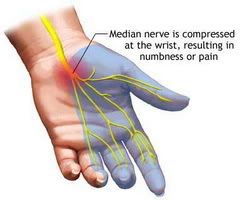
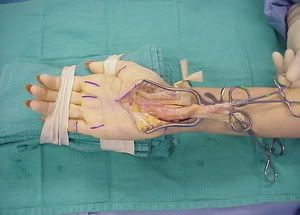
Ever heard about CTS (Carpal Tunnel Syndrome) ? It's a name of acute sprain muscles for hands. Started by overworking your hands at the wrong position, first your hands will just feels tired and as time goes by the sprain getting worse your hand start having tingling hurt and if you just let this one day it will get worse to the point you won't even able to hold a paper with your hands. The only solution for the worst condition is having a surgery but the surgery won't guarantee that your hands will be healthy forever, the syndrome can get back if you don't take care of your hands.

Looking for good prevention? Try Workrave application. It's a free reminder application to warn you if you had worked too long without a break. So far I've been using this application for months in Windows 7 and it works. What this application do? Basically it just a reminder application, you can set the work hours interval to make you take a break. For example, you can set Workrave to remind you to take a break every one hour work using your computer. When you don't use your computer the countdown timer will pause so you don't have to worry about how long you've been really using the computer. You can decide how long the break you wanna take, just a micro break or you need a coffee break? Will you need to postpone your break? You can set it all. I found this application so simple but yet complete function to warn me to take a break. Here is the application's introduction written in the site.
Workrave is a program that assists in the recovery and prevention of Repetitive Strain Injury (RSI). The program frequently alerts you to take micro-pauses, rest breaks and restricts you to your daily limit. Please refer to the feature comparison for a complete list of features, and how the program performs with respect to other programs on the market. The program runs on GNU/Linux and Microsoft Windows. http://www.workrave.org/
So...what do you wait for? Download it, install it, setup it, and try it yourself the benefit.

Wednesday, June 4, 2008

Be Aware Of CTS...!

Ada yang hobinya di depan komputer sampai berjam-jam?? Yap, Chubby termasuk salah satunya. Hehehe. Kalo sudah lagi kerja tugas bisa empat jam non stop di depan monitor. Tak terasa sudah empat tahun kebiasaan itu terbentuk semenjak kuliah di jurusan IT mau tidak mau terpaksa sering berada di depan monitor. Hari ini waktu Chubby baca koran dan baca situs menemukan beberapa hal yang perlu diberi perhatian banget terutama buat kita yang sering banget berlama-lama di depan monitor. Chubby pernah ngebut deadline proposal proyek sampai seharian di depan komputer, beranjak dari komputer cuma buat makan, minum, dan mandi. Waktu itu Chubby merasakan tangan Chubby sakit sekali. Jari-jari tangan ini dibuat ngetik udah sambil cekot-cekot. Chubby sudah menyangka kalo itu akibat terlalu banyak ngetik dan kurang istirahat tapi mau gimana lagi deadline udah mepet banget. Waktu itu Chubby berpikir toh sakit cuma sementara aja besok kan bisa istirahat. Ternyata pemikiran itu salah besar. Dengan memforsir tangan kita maka besar kemungkinan kita terserang CTS (Carpal Tunnel Syndrome).


CTS adalah penyakit yang terjadi pada pergelangan tangan serta jari yang disebabkan oleh tekanan yang sering terjadi pada bagian tersebut. Dan biasanya sering diakibatkan karena terlalu sering memakai keyboard dan mouse. Walaupun banyak penyebab lainnya tetapi penggunaan komputer yang terlalu sering menjadi penyebab penyakit persendian tangan ini. Gejala-gejalanya antara lain sering pegal atau nyeri pada pergelangan tangan maupun jari tangan (ibu jari, jari telunjuk, jari tengah).


Menurut penelitian, wanita beresiko 3 kali lipat terkena CTS dibanding pria. Entah kenapa demikian tapi mungkin karena struktur genetika wanita. Seseorang yang terkena CTS dan dibiarkan saja bisa menyebabkan putusnya urat-urat sendi pergelangan tangan sehingga tangan tidak dapat berfungsi secara normal bahkan tidak bisa digerakkan sama sekali. Nah, ngeri banget kan bahayanya. Jika sudah sampe level parah maka satu-satunya jalan adalah dengan operasi. Tapi operasi pun tidak menjamin untuk tidak terulangnya terkena CTS.


Nah di bawah ini adalah gambar yang menunjukkan posisi duduk yang benar untuk mencegah CTS.

Friday, April 25, 2008

IT Certification & Training Centre

Hi guys..! Sebagai orang yang berkutat di bidang IT pasti hal ini pernah terpikir oleh kalian. Pernah terbayang begitu lulus kita akan bersaing dengan ribuan manusia dengan embel-embel Sarjana Komputer? Ngeri juga yah kalo dibayangkan betapa berat persaingan di dunia kerja itu.

Lalu bagaimana caranya biar kita bisa menonjol dan lebih daripada yang lain? Belajar sendiri OK juga sih tapi kan di ijazah kita tidak tercantum semua yang sudah kita pelajari secara otodidak. Jangan-jangan baru masukin curriculum vitae aja kita sudah ngga lolos filter. So mau ga mau kita harus berusaha supaya pada waktu bagian personalia melihat curriculum vitae kita akan berpikir dua kali sebelum menyisihkannya. Lha trus apa yang harus kita cantumkan di curriculum vitae kita??

Here is one of the solution we can try. Get an international certification misalnya kaya CCNA, OCA, atau MCT dan masih banyak lagi. Tapi semua training-training itu cukup mahal kan? Yup, memang mahal and cost some money. Tapi jangan kuatir, mungkin ini bisa dijadikan solusi. Di bawah ini adalah tempat training di Surabaya untuk beberapa sertifikasi internasional yang cukup murah dibandingkan yang lain karena background-nya adalah institusi akademik.

iSTTS (Institut Sains Terapan dan Teknologi Surabaya)
Jl. Ngagel Jaya Tengah 73-77, Surabaya

Certification and Training Centre yang diberikan saat ini adalah :
  • Cisco Certified Networking Academy (CCNA)
  • Oracle Workforce Development Program (OWDP)
Informasi lebih lanjut tentang iSTTS bisa dicek di sini atau bisa langsung menghubungi:
Ibu Susi, Bagian Administrasi Laboratorium
Ruang : L-202
Telp : (031) 5021252
Jam Kerja : Senin s/d Jumat (8 am- 17:00)

Wednesday, April 9, 2008

Fight for our freedom...!

Hi guys...! Im sure a lot of us must get upset with our stupid government. Just because a piece of movie which they believe is not true and afraid of it then they block almost all major sites that is very important for most of us and spending a lot money while once you type that movie title on Google keyword and go for some search you still can find it easily anywhere. So what the purpose of that blocking? So here I'd like to share with you how to access them back.

If you just want to browsing to those blocked web and have no intention for any download or no need for login then you can just use web proxy. Here how to do it.

  • Just type "Anonymous Proxy" at Google search and choose one from them then put your web URL into it. That anonymous proxy site will just redirect you to your web and

If you want to have some download or need to login from those blocked web you can't use just a web proxy. You must definitely change you browser's proxy. Here how to do it.

  • Get your browser, find out your proxy setting, and change it to manual proxy configuration with one of this proxy lists :
http proxy : support.padangcrew.com
port : 9999

http proxy : 87.117.188.2
port : 3128
( some people has reported this proxy can't be used but some success with this, so just try yourself)

http proxy : 200.65.127.161
port : 80

From the information that i got the last is the fastest one. If you find one of them can't be used just tell me. And if you have other proxy to share just tell me and i'll add it.

Khusus untuk rapidshare ada beberapa cara alternatif lagi untuk download tanpa harus menggunakan web proxy atau manual proxy configuration. Silahkan cek di sini. Sedangkan untuk premium download pada rapidshare menggunakan web proxy silahkan coba ini.